List of products and their properties
Define the products you are licensing and the features that can be enabled
Table of content
When you setup the license sale and delivery server you need to define the products
you are going to sell and specify the parameters of the licenses that correspond to them. That is done via the
products.json configuration file. If you release a new product, then again you need to edit this file.
QuidLM does not provide a GUI for setting up this configuration. In part, the reason is that this is an analytical
task, so it requires both the flexibility and rigor.
In this section we will consider the entries of the configuration file that ships with the server and corresponds to the products displayed on the demo web site. They provide an example of what each part of the configuration file does.
The configuration file
First, the entire configuration file:
{
    "PowerReports XL 1.0": {
        "name": "PowerReports XL 1.0",
        "description": "Excel plugin, released in 2021",
        "parameters": [
            {
                "name": "Trial license",
                "description": "Display the **Trial** badge",
                "paths": [
                    "/options/trial"
                ],
                "remove_when_default": true
            },
            {
                "name": "DAX",
                "description": "Enable Data Analytic Expressions",
                "paths": [
                    "/options/DAX"
                ]
            }
        ],
        "licenses": [
            {
                "count": 5,
                "expires": "2000-01-01",
                "issuer": "iPower",
                "options": {
                    "trial": false,
                    "DAX": false
                },
                "product": "PowerReports XL",
                "version": "1.0"
            }
        ]
    },

    "PowerReports XL 2.0": {
        "name": "PowerReports XL 2.0",
        "description": "Excel plugin, released in 2022",
        "parameters": [
            {
                "name": "Trial license",
                "description": "Display the **Trial** badge",
                "paths": [
                    "/options/trial"
                ],
                "remove_when_default": true
            },
            {
                "name": "DAX",
                "description": "Enable Data Analytic Expressions",
                "paths": [
                    "/options/DAX"
                ]
            },
            {
                "name": "Threads",
                "description": "Allow multithreaded execution with the specified number of threads",
                "paths": [
                    "/options/threads"
                ],
                "remove_when_default": true
            }
        ],
        "licenses": [
            {
                "count": 5,
                "expires": "2000-01-01",
                "issuer": "iPower",
                "options": {
                    "trial": false,
                    "DAX": false,
                    "threads": 0
                },
                "product": "PowerReports XL",
                "version": "2.0"
            }
        ]
    },

    "PowerReports SDK 2.0": {
        "name": "PowerReports SDK 2.0",
        "description": "Software Development Kit for Python, C#, and Java",
        "parameters": [
            {
                "name": "DAX",
                "description": "Enable Data Analytic Expressions",
                "paths": [
                    "/options/DAX"
                ]
            },
            {
                "name": "Threads",
                "description": "Allow multithreaded execution with the specified number of threads",
                "paths": [
                    "/options/threads"
                ],
                "remove_when_default": true
            }
        ],
        "licenses": [
            {
                "count": 5,
                "expires": "2000-01-01",
                "issuer": "iPower",
                "options": {
                    "DAX": false,
                    "threads": 0
                },
                "product": "PowerReports SDK",
                "version": "2.0"
            }
        ]
    }
}
The subsequent sections look at the parts of this file and explain what they do. We will start from the top level and drill down to deeper details.
Product names
Let's look at the least indented parts of the file:
{
    "PowerReports XL 1.0": {
        "name": "PowerReports XL 1.0",
        "description": "Excel plugin, released in 2021",
        "parameters": [
            // elided for now
        ],
        "licenses": [
            // elided for now
        ]
    },

    "PowerReports XL 2.0": {
        "name": "PowerReports XL 2.0",
        "description": "Excel plugin, released in 2022",
        "parameters": [
            // elided for now
        ],
        "licenses": [
            // elided for now
        ]
    },

    "PowerReports SDK 2.0": {
        "name": "PowerReports SDK 2.0",
        "description": "Software Development Kit for Python, C#, and Java",
        "parameters": [
            // elided for now
        ],
        "licenses": [
            // elided for now
        ]
    }
}
Stripped of the details, you probably can immediately see that the file defines 3 products. Each product definition is a key-value pair, where the key is the product ID. Note that in this file, the authors chose to make the product version a part of the product ID, and you may choose otherwise - the version can be one of the product parameters. Each product name has the corresponding value, which is an object with 4 properties:
- name
- This is displayed name of the software product. Often it will be the same as the product ID. The existence of this property allows you to rename the product. The product ID must never change.
- description
- Describes the product in a sentence or two. This text will be displayed on the **Products** page and in the **Order** dialog, so use it to avoid confusion between the products during the ordering process.
- parameters
- These are product features, each of them is an object with several attributes, and they exist to customize the license for the particular sale. For example, they can define license modules - the features of your product that you may want to turn on or off for different customers.
- licenses
- These are license templates that will be edited based on the **parameters**.
The product names, descriptions and IDs are front and center on the Products page:

We will drill down into parameters and licenses in the next section.
Licenses
Your application typically requires one license to run, but may require more. For example, you may choose to enable different features of your product with different licenses. In our example, each product requires just one license, but the licenses attribute is an array, which allows more than one license. Let us look at what is in that attribute of the PowerReports XL 1.0 product:
        "licenses": [
            {
                "count": 5,
                "expires": "2000-01-01",
                "issuer": "iPower",
                "options": {
                    "trial": false,
                    "DAX": false
                },
                "product": "PowerReports XL",
                "version": "1.0"
            }
        ]
Each license listed in that attribute is represented by an object. The properties of that object are ordered alphabetically, but we will explain them in a different order:
- issuer
- This is your company's ID, assigned to you at the time you purchase QuidLM.
- product, version
-
These are the product name and product version that appear in the
qlm_checkout_license(product_name, product_version)call in your application. They are the identifiers that your application uses to tell QuidLM which license to check out. - expires
- The expiration date of the license, in the `yyyy-mm-dd` format.
- count
- This field determines the number of users that can use this license at the same time - for floating licenses. If this field is missing, or equals 0, the license is node-locked - it is then not controlled by the floating license server and needs to be tied to a specific device.
- options
-
This is an optional object with any number of attributes. You decide what those attributes are.
One typical use of the options is to define your product's optional capabilities, that you want
to enable on a per-sale basis. In this example we have two flags, trial and DAX. The first
may mean (if set to true) that the product is given to the customer as a trial, and your software
may display a trial badge somewhere in the interface to remind the customer to purchase a non-trial
version. The second can be an premium optional feature of your product, and the
truevalue of that attribute would enable it. The attributes do not need to be boolean - they can be numbers or strings.
Product parameters
Let us consider the parameters of the PowerReports XL 2.0 product:
        "parameters": [
            {
                "name": "Trial license",
                "description": "Display the **Trial** badge",
                "paths": [
                    "/options/trial"
                ],
                "remove_when_default": true
            },
            {
                "name": "DAX",
                "description": "Enable Data Analytic Expressions",
                "paths": [
                    "/options/DAX"
                ]
            },
            {
                "name": "Threads",
                "description": "Allow multithreaded execution with the specified number of threads",
                "paths": [
                    "/options/threads"
                ],
                "remove_when_default": true
            }
        ],
The parameters define the Options controls of the ordering dialog:
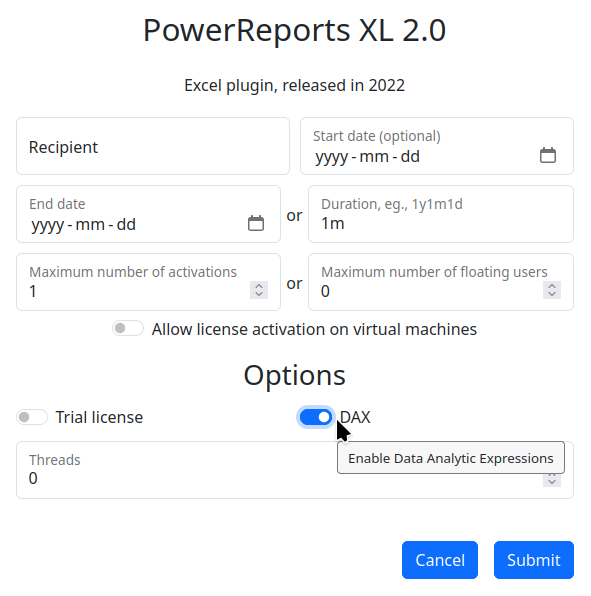
You decide what parameters your product has. A typical use of parameters is to define your product's
optional capabilities, which you want to enable on a per-sale basis.
In this example we have three parameters, Trial license, DAX, and Threads. The first
may mean (if set to true) that the product is given to the customer as a trial, and your software
may display a trial badge somewhere in the interface to remind the customer to purchase a non-trial
version. The second can be an premium optional feature of your product, and the true value of
that attribute would enable it. The Threads parameter may determine your application's performance
by specifying the maximum number of CPU threads your software will use.
Parameters have the following attributes:
- name
- The name displayed next to the input control.
- description
- The parameter's description, displayed when mouse pointer is over the input control or the parameter's name.
- paths
-
This specifies where the selected value will be written in the license template. For example,
/options/threadssays that the parameter's value selected in the ordering dialog is written into thethreadsattribute of the options. This specifier also decides which input control is used in the ordering dialog box for this parameter. By looking into the license template, we can see that thethreadsattribute has the default value of 0, so that is the default value presented in the ordering dialog. That default value in this case also determines that the input control is customized for inputting numbers. Boolean default value causes the dialog to use a toggle, while a string selects a generic input box. - remove_when_default
-
This is an optional parameter. If you do not specify it, its value will be taken as
false. If set totrue, the attribute(s) specified by paths are removed from the license if the parameter value was not changed from its default state during the ordering process. This is a "cosmetic" functionality, which aims at producing slightly shorter and more readable license files, by removing an irrelevant information.